


Introduction
The digital world is powered by websites and web applications that help people communicate, shop, learn, and conduct business online. Every website, whether it is a personal blog, an online store, or a large business portal, is built using three essential technologies. Learning HTML, CSS, and JavaScript Basics is the first and most important step toward understanding how websites are created and how they function. These technologies work together to create attractive, responsive, and interactive web pages that users can access from any device.
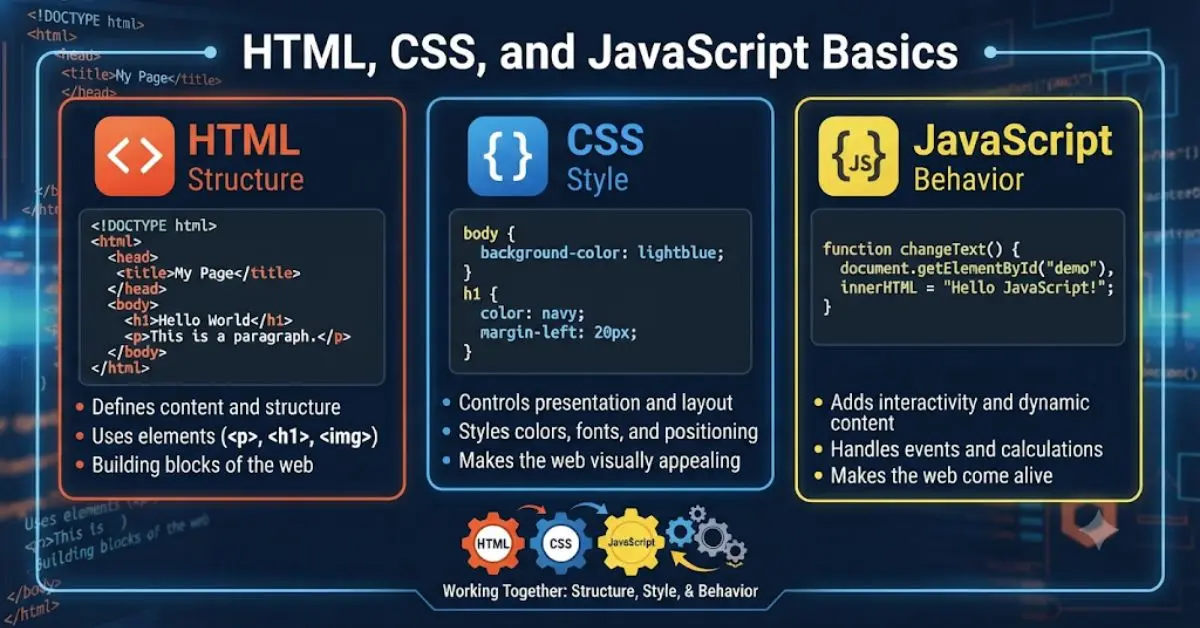
For beginners, the idea of learning web development may seem challenging at first. However, once you understand the purpose of each technology, the process becomes much easier. HTML provides the structure of a webpage, CSS controls its appearance and layout, while JavaScript adds functionality and interactivity. Together, they form the foundation of front-end web development and are used in almost every website on the internet today.
One of the biggest advantages of learning HTML, CSS, and JavaScript basics is that you can start with very little investment. A computer, a modern web browser, and a simple text editor are enough to begin your learning journey. As your knowledge grows, you can build professional websites, create interactive applications, or even pursue a successful career as a web developer or freelancer.
This guide explains the fundamentals of HTML, CSS, and JavaScript in a simple and practical way. By the end, you will understand how these technologies work together and why mastering them is essential for anyone interested in web development.
What are HTML, CSS, and JavaScript Basics?
HTML, CSS, and JavaScript are the three core technologies used to create websites. Although each has a different purpose, they work together to build complete and functional web pages. Understanding their individual roles makes learning web development much easier.
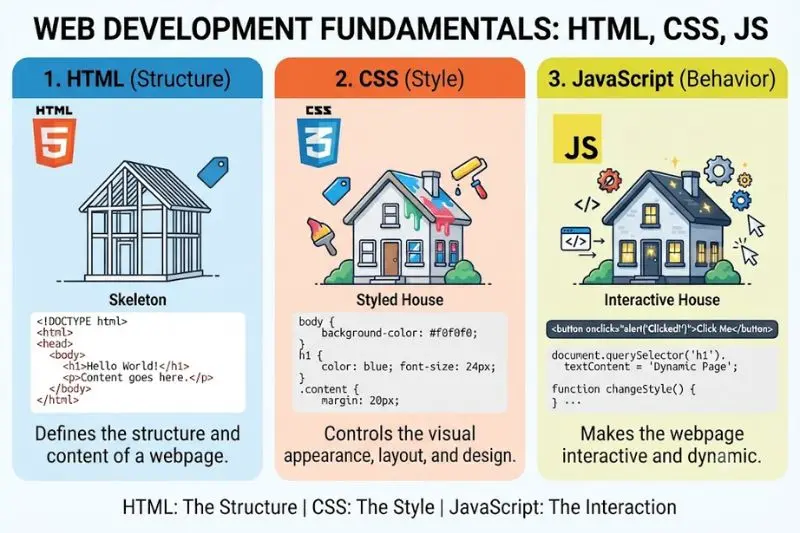
Imagine building a new house. The walls, doors, windows, and rooms represent the structure. The paint, furniture, lighting, and decoration represent the appearance. Finally, the electrical systems, automatic doors, and smart devices represent functionality. Web development follows a similar approach. HTML creates the structure, CSS improves the design, and JavaScript brings the website to life through interactive features.
HTML: The Structure of a Website
HTML stands for HyperText Markup Language. It is the standard markup language used to organize the content of a webpage. Every heading, paragraph, image, table, button, list, and hyperlink you see on a website is arranged using HTML elements.
A basic HTML page begins with a document declaration that tells the browser it is reading an HTML document. Inside the main HTML element, there is a head section that contains information such as the page title and metadata. The body section contains everything visitors actually see, including headings, text, images, buttons, and other content. When the browser reads these elements, it displays them in a structured format that users can easily understand.
HTML uses different tags for different purposes. Heading tags organize titles and subtitles, paragraph tags display text, image tags insert pictures, anchor tags create clickable links, form tags collect user information, while table tags organize data into rows and columns. These elements allow developers to build meaningful and well-structured webpages.
Without HTML, a webpage would have no organized content, making it impossible for browsers to display information correctly.
CSS: The Design and Appearance of a Website
CSS stands for Cascading Style Sheets. While HTML creates the structure, CSS is responsible for making that structure visually appealing. It controls colors, fonts, spacing, backgrounds, layouts, borders, animations, and responsive designs that adapt to different screen sizes.
For example, after creating a heading with HTML, CSS can change its text color to blue, increase its font size, center it on the page, and add spacing around it. These visual improvements make the webpage more attractive and easier to read.
CSS also helps create responsive websites that automatically adjust to desktops, tablets, and smartphones. Instead of designing separate websites for different devices, developers can use CSS to create flexible layouts that provide a consistent experience for every visitor.
Modern websites rely heavily on CSS because attractive design improves user engagement, readability, and overall user experience.
JavaScript: Adding Interactivity
JavaScript is the programming language that makes websites interactive. While HTML provides content and CSS improves appearance, JavaScript allows webpages to respond to user actions.
For example, when a visitor clicks a button, JavaScript can display a welcome message, validate a form before submission, open a navigation menu, change images automatically, update information without refreshing the page, or calculate values instantly. These dynamic features create a better experience for users.
Instead of showing programming code, think of JavaScript as a set of instructions that tell the browser what action to perform whenever a visitor interacts with a webpage. Every click, keyboard input, mouse movement, or page scroll can trigger JavaScript to perform a specific task.
Today, JavaScript is one of the world’s most popular programming languages because it powers everything from simple websites to advanced web applications.
How HTML, CSS, and JavaScript Work Together
Although each technology performs a different job, they are designed to work as a team.
HTML creates the webpage structure by organizing content into headings, paragraphs, images, and buttons. CSS then styles these elements by adding colors, fonts, spacing, and layouts that improve visual appearance. Finally, JavaScript makes these elements interactive by responding to user actions such as clicks, form submissions, or menu selections.
For instance, imagine creating a “Buy Now” button. HTML first creates the button itself. CSS then changes its background color, text style, size, and position so it stands out on the page. Finally, JavaScript allows the button to perform an action, such as displaying a confirmation message or adding a product to a shopping cart when clicked.
This teamwork between HTML, CSS, and JavaScript is what makes modern websites both attractive and functional.
Why are HTML, CSS, and JavaScript Basics Important?
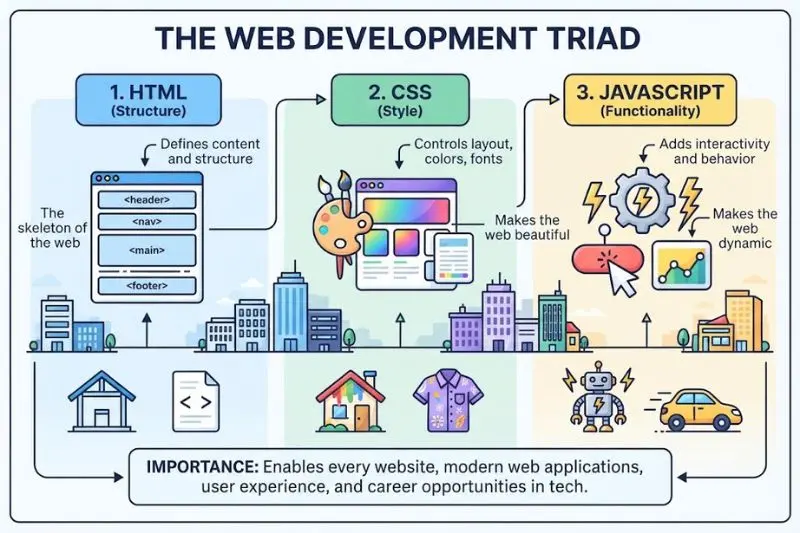
Learning HTML, CSS, and JavaScript Basics is valuable because these technologies form the foundation of front-end web development. Every aspiring web developer, UI designer, or software engineer begins by understanding these core technologies before moving on to advanced frameworks and programming languages.
One important advantage is accessibility. Anyone can begin learning with a basic computer and an internet browser. Expensive software or powerful hardware is not required. This makes web development one of the most beginner-friendly technical skills available today.
Another major benefit is career opportunity. Businesses of every size need professional websites to promote products, communicate with customers, and build their online presence. As a result, skilled front-end developers are consistently in demand across industries.
Learning these technologies also encourages logical thinking and creativity. Developers solve problems by organizing information, designing layouts, and creating interactive features that improve user experience. These problem-solving skills remain valuable throughout a technology career.
Additionally, HTML, CSS, and JavaScript continue to evolve while maintaining their importance. Even modern technologies such as React, Vue, Angular, and many other development tools rely heavily on JavaScript and standard web technologies. Building a strong foundation today makes learning advanced concepts significantly easier in the future.
Some key reasons to learn HTML, CSS, and JavaScript basics include:
- Build professional websites from scratch.
- Start a career in front-end web development.
- Work as a freelance web developer.
- Understand how modern websites function.
- Create responsive and mobile-friendly webpages.
- Improve logical thinking and problem-solving skills.
- Prepare for learning advanced web development frameworks.
- Develop practical digital skills that remain valuable for years.
Detailed Step-by-Step Guide
Step 1: Set Up Your Development Environment
Before creating your first webpage, you need a simple and organized development environment. Fortunately, web development requires very few tools, making it easy for beginners to get started.
Begin by installing a reliable code editor such as Visual Studio Code or another text editor designed for programming. These editors provide useful features like syntax highlighting, automatic suggestions, and organized file management that make writing HTML, CSS, and JavaScript much easier.
Next, install a modern web browser such as Google Chrome, Mozilla Firefox, Microsoft Edge, or Safari. These browsers include built-in developer tools that allow you to inspect webpage elements, identify styling issues, and troubleshoot JavaScript functionality.
Create a dedicated project folder on your computer where all website files will be stored. Inside this folder, prepare three separate files. One file will contain the HTML structure, another will manage CSS styling, and the third will handle JavaScript functionality. Organizing files this way keeps projects clean, professional, and easy to maintain as they grow.
Once everything is ready, open your project folder in your code editor and begin creating your first webpage using HTML. As you continue learning, you will gradually connect your CSS file to improve the design and your JavaScript file to add interactive features.
Step 2: Learn the Fundamentals of HTML
After setting up your development environment, the next step is understanding HTML. Since HTML forms the backbone of every webpage, mastering its basics should be your first priority.
Start by learning how headings, paragraphs, lists, links, images, tables, and forms are used. Each HTML element has a specific purpose, helping browsers display content in an organized and meaningful way. Properly structured HTML also improves accessibility and search engine optimization.
For example, when creating a webpage for a restaurant, you would use headings for the restaurant name, paragraphs for descriptions, images for food items, and buttons for reservations. This organized structure helps both visitors and search engines understand the page content.
As you practice, focus on creating clean and readable HTML. Well-organized code is easier to maintain and makes future updates much simpler.
Step 3: Style Your Website with CSS
Once your webpage structure is complete, the next step is making it visually appealing with CSS. A plain webpage may contain useful information, but an attractive design encourages visitors to stay longer and explore more pages.
CSS allows you to customize text colors, font styles, spacing, backgrounds, borders, and layouts. It also helps create consistent designs across multiple pages by applying the same styling rules throughout your website.
Imagine you have created a heading for your homepage. Instead of leaving it as plain black text, CSS allows you to change its color, increase its size, center it on the page, and add spacing around it. These small improvements create a more professional appearance.
Similarly, CSS can transform ordinary buttons into colorful call-to-action buttons that encourage visitors to click. It can also arrange content into columns, create attractive navigation menus, and make websites look polished on every screen size.
Step 4: Add Interactivity with JavaScript
After building the structure and styling the design, it’s time to make your website interactive using JavaScript.
Interactivity makes websites more engaging by allowing them to respond to user actions. Instead of displaying static information, JavaScript enables websites to perform tasks whenever users click buttons, fill out forms, move the mouse, or submit information.
For example, when a visitor clicks a “Contact Us” button, JavaScript can display a thank-you message without reloading the page. It can also check whether users have entered valid email addresses before submitting a form, reducing errors and improving user experience.
Many popular website features, including image sliders, dropdown menus, live search boxes, calculators, countdown timers, and shopping carts, depend on JavaScript.
Step 5: Understand Responsive Web Design
Today, people browse websites using desktops, laptops, tablets, and smartphones. A website that looks perfect on a computer may become difficult to use on a mobile phone if it is not responsive.
Responsive web design ensures that webpages automatically adjust to different screen sizes without sacrificing usability or appearance.
CSS plays a major role in responsive design by allowing layouts to resize, images to scale properly, and navigation menus to adapt to smaller screens. Developers create flexible designs that provide users with a comfortable browsing experience regardless of the device they use.
Learning responsive design early helps you create websites that meet modern web standards and perform well across multiple platforms.
Step 6: Practice with Small Projects
Theory alone is never enough to master web development. The best way to improve your skills is by creating small projects that combine HTML, CSS, and JavaScript.
Begin with simple websites such as personal portfolios, landing pages, restaurant websites, or online resumes. These projects help reinforce the concepts you’ve learned while introducing you to real-world design challenges.
As your confidence grows, try building more advanced projects like calculators, to-do lists, weather applications, or interactive quizzes. Every completed project improves your coding skills and strengthens your portfolio.
Step 7: Continue Learning Advanced Concepts
Once you are comfortable with HTML, CSS, and JavaScript basics, you can begin exploring more advanced topics.
These include responsive frameworks, CSS animations, JavaScript libraries, version control systems, web accessibility, performance optimization, and modern development tools.
Because these advanced technologies are built upon HTML, CSS, and JavaScript, having a strong foundation makes learning them much easier.
Benefits of HTML, CSS, and JavaScript Basics
Learning HTML, CSS, and JavaScript offers numerous personal and professional advantages.
- Provides a strong foundation for web development.
- Makes learning advanced programming technologies easier.
- Opens opportunities for freelancing and remote work.
- Helps create responsive and professional websites.
- Improves creativity through visual design.
- Strengthens logical thinking and problem-solving abilities.
- Enables you to build personal, business, and portfolio websites.
- Supports career growth in software development.
- Allows customization without relying entirely on website builders.
- Develops practical digital skills that remain valuable for years.
Disadvantages and Risks
Although these technologies are essential, beginners may face several challenges while learning them.
- Learning three technologies at the same time can feel overwhelming.
- Browser compatibility issues sometimes require additional testing.
- Small syntax mistakes may cause unexpected webpage behavior.
- JavaScript debugging can become difficult in larger projects.
- Responsive design requires extra practice and testing.
- Keeping up with modern web standards requires continuous learning.
- Large projects demand proper organization and planning.
- Poor coding practices can make future maintenance difficult.
Despite these challenges, consistent practice makes learning much easier, and every project helps improve your confidence and technical skills
Common Mistakes to Avoid
Many beginners make similar mistakes during their learning journey. Avoiding these habits can save significant time and frustration.
One common mistake is trying to learn advanced frameworks before mastering HTML, CSS, and JavaScript basics. Building a strong foundation first makes advanced topics much easier to understand.
Another mistake is writing poorly organized HTML. Proper headings, semantic elements, and meaningful page structure improve readability, accessibility, and SEO.
Many beginners also ignore responsive design until the end of a project. Instead, develop the habit of testing your webpages on different screen sizes from the beginning.
Some learners focus only on watching tutorials without building their own projects. Practical experience is far more valuable than passive learning because it develops problem-solving skills.
Finally, avoid copying complete projects without understanding how they work. Studying examples is helpful, but true improvement comes from creating websites independently and experimenting with different ideas.
FAQs
Is learning HTML, CSS, and JavaScript enough to become a web developer?
Learning HTML, CSS, and JavaScript basics is the best starting point for becoming a web developer. These three technologies provide the foundation for front-end development and are required before learning advanced frameworks or backend programming. Once you become confident with these fundamentals, you can explore technologies such as responsive frameworks, databases, server-side programming, and version control to expand your skills and career opportunities.
How long does it take to learn HTML, CSS, and JavaScript?
The learning time depends on your consistency and practice routine. Most beginners can understand HTML within a few weeks, while CSS usually takes another few weeks of regular practice. JavaScript requires more time because it introduces programming concepts. With daily practice and small projects, many learners develop a solid understanding of HTML, CSS, and JavaScript basics within three to six months.
Do I need a computer science degree to learn web development?
No. A formal degree is not required to learn HTML, CSS, and JavaScript. Thousands of successful developers are self-taught and have built impressive careers through continuous learning and practical experience. Employers and clients often value practical skills, strong portfolios, and problem-solving abilities more than academic qualifications.
Can I build professional websites using only HTML, CSS, and JavaScript?
Yes. Many business websites, portfolio websites, blogs, and landing pages can be created using only these three technologies. While larger web applications may require additional tools and backend technologies, HTML, CSS, and JavaScript remain the essential building blocks for every professional website.
Which should I learn first: HTML, CSS, or JavaScript?
The recommended learning order is HTML first, CSS second, and JavaScript third. HTML teaches you how webpages are structured, CSS helps you style and organize the design, and JavaScript introduces programming concepts that make websites interactive. Following this sequence creates a smooth learning experience and prevents unnecessary confusion.
What are the best ways to improve web development skills?
The most effective way to improve is through regular practice. Build personal websites, redesign existing webpages, create interactive projects, and challenge yourself with new ideas. Reading documentation, experimenting with different layouts, solving real-world problems, and reviewing your previous work will help you grow much faster than simply watching tutorials.
Expert Tips & Bonus Points
Learning web development is a long-term journey, but following a few proven strategies can make the process easier and more enjoyable.
- Practice coding every day, even if only for thirty minutes.
- Focus on understanding concepts instead of memorizing syntax.
- Build small projects before attempting complex applications.
- Keep your HTML clean and well organized.
- Write reusable and consistent CSS styles.
- Test your websites on multiple browsers and devices.
- Learn keyboard shortcuts to improve productivity.
- Review and improve old projects to strengthen your understanding.
- Stay updated with modern web development trends.
- Create a professional portfolio to showcase your work.
- Learn basic SEO principles so your websites perform better in search engines.
- Be patient with mistakes because every error is an opportunity to learn something new.
Bonus Advice
Successful web developers are not those who memorize every command. They are the ones who understand how to solve problems, think logically, and continue learning as technology evolves. Every project you complete increases your confidence and prepares you for more advanced challenges. Consistency, curiosity, and regular practice are far more valuable than trying to learn everything at once.
Conclusion
Learning HTML, CSS, and JavaScript Basics is one of the smartest investments you can make if you want to enter the world of web development. These three technologies work together to create the websites and web applications that people use every day. HTML provides the structure, CSS enhances the visual appearance, and JavaScript adds the interactivity that transforms a simple webpage into a dynamic user experience.
Although learning these technologies may seem challenging in the beginning, consistent practice makes the process much easier. By starting with the fundamentals, building small projects, and gradually exploring more advanced concepts, you develop the confidence and skills needed to create professional websites. Every project teaches valuable lessons that improve both your technical knowledge and problem-solving abilities.
The demand for web development skills continues to grow as businesses expand their online presence. Whether your goal is freelancing, starting a technology career, creating personal projects, or launching your own business website, understanding HTML, CSS, and JavaScript provides countless opportunities for growth.
Remember that becoming a skilled developer is a journey rather than a destination. Continue practicing, remain curious, and keep challenging yourself with new ideas and projects. With dedication and persistence, the knowledge you gain from mastering HTML, CSS, and JavaScript basics will serve as a strong foundation for a successful future in modern web development.
